


At 11:17 a.m., Rajesh Mehta stared at the thin red line on his phone screen. Ten percent battery.
He hadn’t watched videos. He hadn’t played games. His phone had barely left his pocket during the morning commute from Navi Mumbai to his office. Yet somehow, the battery had evaporated before lunchtime.
So he opened the battery settings. The culprit wasn’t obvious just a cluster of everyday apps quietly humming in the background. Messaging. Social media. A few productivity tools. None looked suspicious, yet the damage was done.
For millions of Android users, this scenario is painfully familiar: the phone that starts the day at 100 percent but struggles to make it to evening.
Now Google is stepping in to expose the invisible battery drain.
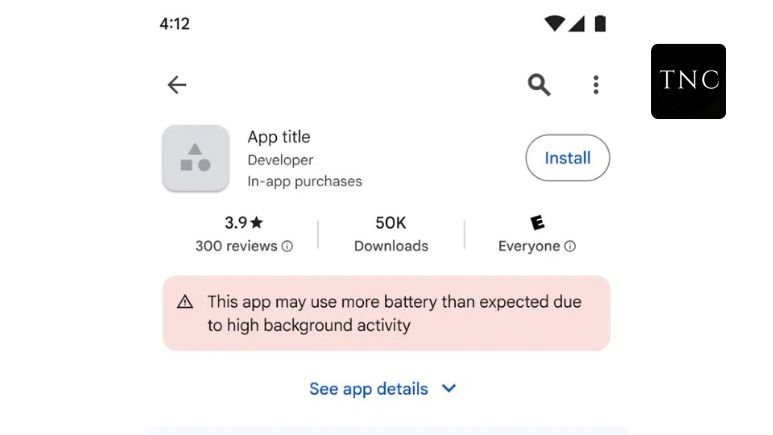
Google has introduced a new warning system on the Google Play Store that alerts users when an app consumes unusually high battery power. The label appears directly on the app’s listing, warning that the app “may use more battery than expected due to high background activity.”
The goal is simple: help users identify battery-draining apps before installing them and push developers to optimize their software. Apps that repeatedly show excessive battery usage may even lose visibility in Play Store recommendations.
It’s a small label but it could reshape how apps compete in the Android ecosystem.
Battery drain on smartphones rarely comes from dramatic actions. The real problem lives in the background.
Many apps rely on a mechanism called “partial wake locks.” This feature allows an app to keep the phone’s processor active even when the screen is off. When used properly, it enables tasks like downloading files, syncing messages, or tracking location. But when misused, it prevents the device from entering sleep mode quietly draining the battery for hours.
Google’s new policy focuses directly on this behavior.
Under the system, apps are flagged if they excessively hold these wake locks during inactive screen time. In technical terms, if more than 5% of user sessions over the past 28 days show abnormal battery consumption, the app may receive a warning label on its Play Store page.
That warning serves two purposes.
First, it gives users transparency. Instead of installing an app blindly, people can now see whether it is known to drain battery life. This mirrors the broader shift in app stores toward clearer information similar to privacy labels and performance indicators.
Second, it puts pressure on developers. Apps that fail to fix battery inefficiencies may be removed from prominent discovery sections such as recommendations or featured listings.
In the competitive world of mobile apps, losing visibility can be devastating. Downloads drop. Ratings suffer. Revenue follows.
For developers, the message is clear: efficient code is no longer optional.
The change also reflects a deeper shift in the Android ecosystem. Smartphones today are powerful computers, but battery technology hasn’t improved at the same pace as processors and screens. That means software optimization matters more than ever. A poorly designed app can burn through battery power even when the user isn’t actively using it.
By surfacing this information in the Play Store itself, Google is effectively turning battery efficiency into a public performance metric.
For years, users blamed their phones when the battery died too quickly.
Now Google is pointing the finger somewhere else at the apps running quietly in the background.
The new Play Store warning labels won’t magically extend battery life overnight. But they do something more powerful: they expose the hidden energy cost of bad apps.
And once users can see the problem, the market usually fixes it.
Also Read / Chinese Company Rolls Out AI Companion Robot That Feels Warm to the Touch.











Leave a comment